What is launchd and how it actually works on macOS
Every process on your Mac was started by one process. PID 1. This is what it actually does.
For the past five years I used my MacBook the way most people do — without thinking about what happens underneath. Recently I started building automations and decided to learn how macOS actually works, from hardware to software. I started with launchd. What I found surprised me: every single process on your Mac — every app, every background service, everything — was started by one process. PID 1. And that process was already running before your desktop appeared.
What is launchd?
Launchd is the first process created in the macOS system after boot. It is the parent of all processes. It does not only create them — what’s more important, it holds their resources, sockets and Mach ports, so they survive crashes. It always has PID 1 and it is created directly by the kernel. It was introduced to replace five separate Unix tools: inetd, xinetd, mach_init, SystemStarter and rc files.
Why was launchd implemented?
Apple decided to replace these five scripts with launchd, which had several benefits.
Faster boot - in the old Unix style systems, the starting boot was sequential which means that first we had to go through one file and just then we could jump to another one, launchd parallelizes it, it all runs simultaneously which uplifts the boot time
Socket activation - launchd holds all sockets and mach ports of all sub processes, which allows them to “fall asleep” when there is nothing to be done, they don’t have to worry about managing the sockets and ports cause launchd does that, if something appears he wakes them up. It is completely opposite to the old unix style where the processes had to hold their resources alone, what forced them to run 24/7. This change allows daemons to go offline — sleeping with zero CPU usage. And when a daemon doesn’t just sleep but crashes — the socket still doesn’t disappear. launchd held it the entire time. The new process starts, receives the same socket, and picks up exactly where the old one left off. If there were any messages that came in while the process was down, they were queued by launchd, so when the process started fresh it received them all. The client never knew anything died.
Proper supervision - before launchd when the process died there was no real supervision why did that happen. the system was just checking “is it running?”, if no it was restarting it, which as we all know is not ideal its like driving a car being blindfolded. Launchd changed 3 things. First it has introduced exit logs - they were saving the way the program was exited. for example exit code 0 meant, that the program was exited intentionally and exit code 9 means the program was brutally exited with no regard for human life(signal 9 is SIGKILL — the kernel’s forced termination. No cleanup, no warning). Another two safety features were included in the plist it was KeepAlive( that was making sure that the process will be restarted if it is not running) and throttle interval, its job was to make sure that the launchd waits specific time before trying to restart the process.
The idea of one supervisor was so strong that Linux decided to create its own systemd, that was behaving in the very similar fashion. although now they have been directed into different ways and still have a lot of things they differ by, they follow the same principle, implemented by Dave Zarzycki for Apple in 2005.
What happens when you press the power button?
Right after you press the power button, your Mac runs a security chain baked into the hardware itself. First the Secure Enclave initializes — a physically isolated processor inside the M2 chip that holds the cryptographic keys the entire boot process depends on. Then Boot ROM runs — code saved on the chip at manufacture that cannot be modified by anything, ever. Boot ROM reads iBoot from disk and verifies it against the keys in the Secure Enclave. If anything doesn’t match, boot stops completely. Then iBoot runs and checks the cryptographic signature of the kernel — reads it from disk. the values don’t match? Boot stops.
This chain exists because Boot ROM is safe but your SSD isn’t. An attacker could replace the kernel on disk with a malicious version. The chain catches that before a single line of compromised code ever runs.
Once the kernel passes verification it takes control. The kernel is the only program on your Mac with direct access to hardware — every process, every memory allocation, every file operation goes through it. It initializes memory, the scheduler, the filesystem. Then it does one thing manually: it spawns launchd. That’s PID 1. The first real process on your machine. Everything else you will ever run will be the descendant of that single process.
How launchd spawns processes?
Many Unix systems like Linux still use the fork() + exec() functions to spawn new processes. How do they work? fork() creates an exact duplicate of the parent’s entire state — its memory, its file descriptors, its Mach ports, its open sockets. exec() then clears that duplicate and loads the target binary in its place. For a normal process this is not a big deal, but for launchd it would be a catastrophic thing to happen.
Now the question is why? why is it so bad? Think about it, when launchd creates hundreds of processes using fork()+exec() would mean that for a short period of time we would have two launchd processes with the power over all sockets and ports with access to almost everything… thats bad. Its like having two presidents of the country, which one should have the power, which one we should trust, thats the problem we could have if we would use launchd with fork exec.
That’s why Apple introduced posix_spawn(). It doesn’t copy a parent process. it creates a new process from scratch. When launchd calls posix_spawn() it sends a syscall to the kernel with parameters it extracted from the plist — file descriptors, Mach ports, security context, QoS class. Kernel itself assigns the PID for the process and sets up the whole structure sets the security sandboxes and assigns the ports based on what parameters he got. After it finishes it returns an already-running process, no parent copy, no duplication of resources.
Daemons vs agents
When I first created my background system on macOS, I thought there was only one type of background process — an agent. I even named mine daemon because it sounded mysterious and powerful. Turns out daemon is a real thing, and the difference between the two matters more than I expected.
A daemon is a background process that lives in /Library/LaunchDaemons. It runs in the system environment — it doesn’t need a user logged in, it doesn’t need a screen, it just runs. Silently, from the moment the system boots. The first daemon created is, as you’d expect, launchd itself. Apple follows a simple naming convention — the d at the end signals daemon. logd, powerd, watchdogd, thermalmonitord. The kernel doesn’t care about that letter. It’s engineers signaling to other engineers.
An agent is different. It lives in ~/Library/LaunchAgents and runs in the user environment. It can’t start until someone logs in. In return it gets something daemons never have — access to the screen, the user’s apps, the running GUI session.
The reason daemons have no GUI access isn’t a restriction Apple imposed arbitrarily. It’s simpler than that — daemons start before WindowServer exists. There is no screen yet. There’s nothing to draw to.
Think of it this way. A daemon is a security guard — present 24/7, no interaction required, responsible for the building whether anyone is inside or not. An agent is a personal assistant — there when you’re there, with access to your desk, your calendar, everything you’re working on.
If you’re building something that needs to show a window or interact with running apps — it’s an agent. If you’re building infrastructure that needs to run regardless of who’s at the keyboard — it’s a daemon.
The plist
Plist stands for Property List. It is the first file launchd reads before calling posix_spawn(). It is not just a configuration file. Every key inside it is a decision about how the process should be treated in every situation: what resources it receives at birth, what happens when it crashes, what happens when it exits cleanly, whether it can be killed under memory pressure. It is your contract with launchd.
Below is the real plist for logd — Apple’s system logging daemon. Every key here is a production engineering decision made by Apple engineers.
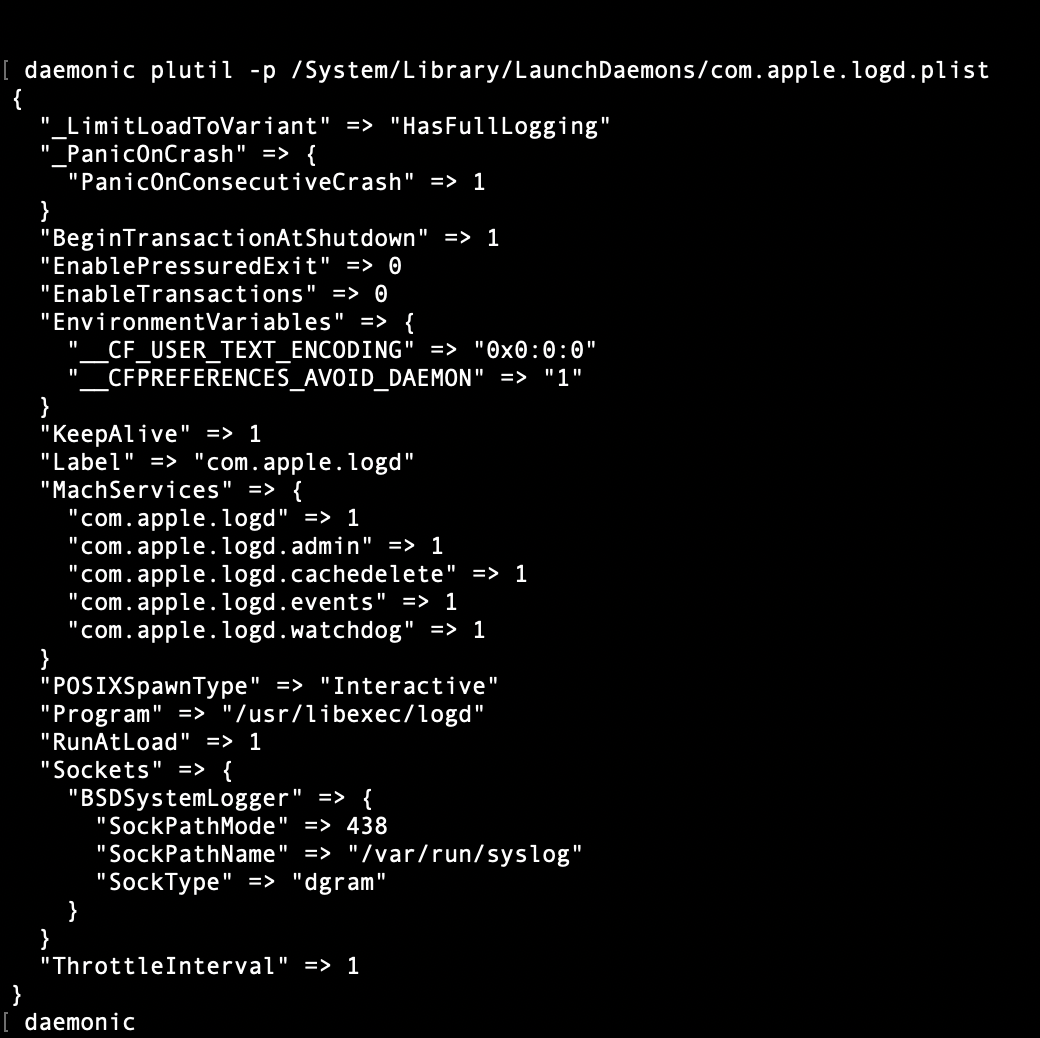
The structure might look odd at first — Label appears in the middle of the file rather than at the top. That’s just how plutil -p works, it outputs keys alphabetically. In the original file on disk, Label is at the top.
Notice the Label value: com.apple.logd. This is reverse domain naming — the same convention used in web domains but flipped. It exists for one practical reason: uniqueness. Two daemons named “logger” is a real problem. Two daemons named com.apple.logger and com.gerger.logger are unambiguous. LaunchD uses the Label as the unique identifier for every service it manages.
Now the interesting keys.
_PanicOnCrash — logd is where every daemon on the system reports what it’s doing. If it goes down and can’t restart, you have no visibility into anything happening on the machine. Apple’s decision here is deliberate: if logd fails repeatedly, force a full system reboot. A reboot is safer than a system running with no supervision.
EnablePressuredExit => 0 — this tells the system that logd cannot be killed when RAM runs low. The reasoning is simple: you cannot diagnose what caused memory pressure if your logging daemon was the first thing that died because of it.
BeginTransactionAtShutdown — logd stays alive until the very last process on the system dies. It captures the final moments of every daemon shutting down. If something goes wrong during shutdown, the evidence is still there.
KeepAlive — tells launchd to restart the process if it exits. Almost always paired with ThrottleInterval, which introduces a minimum wait time between restart attempts. Without it a crashing daemon restarts instantly, crashes again, restarts again — a tight loop that can destabilize the entire system. Often also paired with SuccessfulExit: false inside it, meaning if the process exited cleanly with code 0, don’t restart it — it meant to stop.
__CFPREFERENCES_AVOID_DAEMON — LogD starts and tries to read its preferences. Reading preferences requires cfprefsd. CfPrefsd needs to log. LogD isn’t ready yet. Nobody can move — a boot deadlock. Apple solved it with one environment variable that tells logd to read preferences directly from disk instead, skipping cfprefsd entirely. One line in a plist. Boot deadlock eliminated.
What I found on my Macbook?
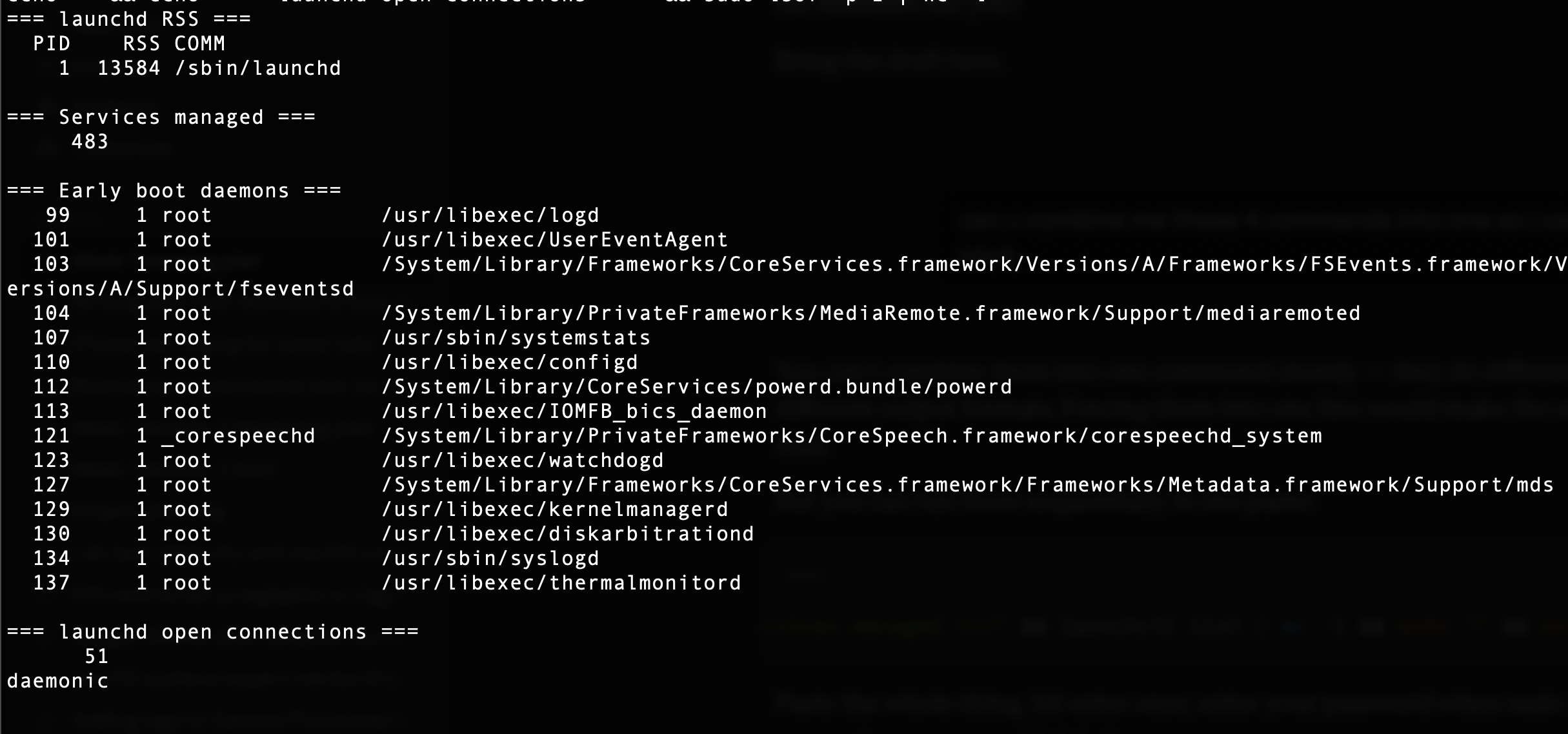
I decided to investigate launchd directly on my M2 to see what it actually looks like from the outside. I ran a few commands and the numbers were more interesting than I expected.
Launchd itself uses 13MB of RAM, isn’t that crazy? The process responsible for supervising 483 processes, holding sockets and Mach ports for every single one of them, uses only 13MB. That’s less than most browser tabs need
Those 483 services aren’t just processes that were launched and immediately forgotten. Launchd is checking on every single one of them constantly. Holding their resources and watching their exit codes, ready to restart them if they crash.
The early boot daemons tell their own story. LogD came in at PID 99. The next ones - 101, 103, 104. These processes were born in the first seconds after the boot. By the time I ran these commands the PID numbers were already in the tens of thousands. Thousands of processes had lived and died since boot. Those early PIDs create the foundation of the system, they have to exist before anything could start.
Then there are the 51 open connections, 51 file descriptors (sockets and Mach ports). All sitting inside launchd on behalf of processes across the system. Some of those processes are running right now. Some haven’t even started yet. Launchd holds their sockets regardless
What surprised me?
When I started to dive deep into the launchd I thought that its only job is to create processes. Now I know that it is not only a boot manager but also and more important a resource broker. Almost everything lives inside of him, every socket, every Mach port, every plist and restart policy. Processes come and go like guests in a hotel; launchd is the hotel manager that never leaves.